Hardware, software, and other tools I use to build things.
Some of my favorite tools and gear that I use on a daily basis to build things. I’m always looking for ways to improve my setup, so this list is constantly evolving.
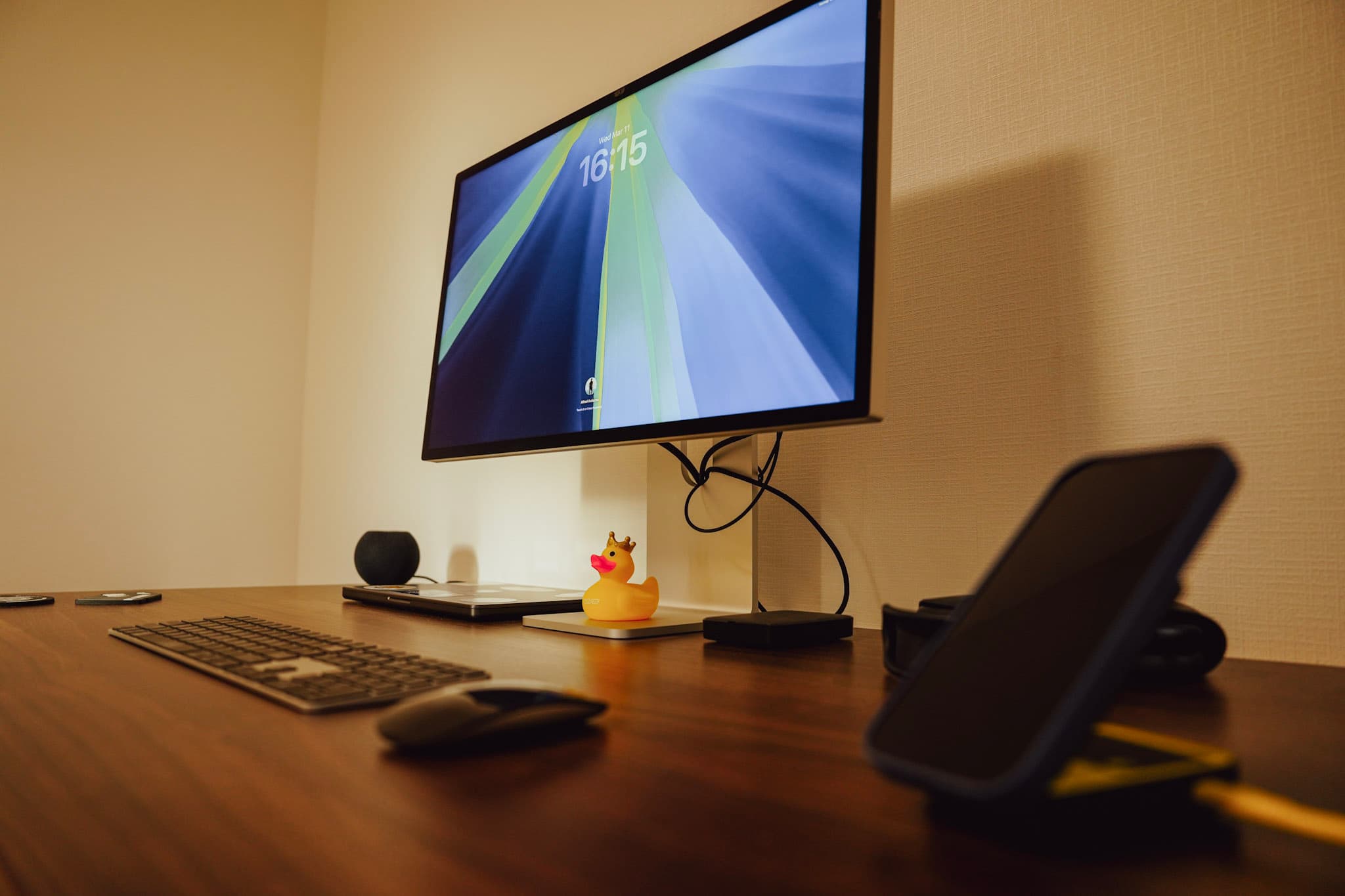
Workstation
14” MacBook Pro, M4 Pro, 48GB RAM (2024, Nano Texture Glass)
The M4 MacBook Pro is a beast and can handle anything I throw at it. I love the 14” size because it’s big enough to be comfortable but small enough to be portable. Memory is plenty for the workloads I do and the battery life is great. I can’t imagine needing more power than this for the next few years. The nano texture glass is preferable to the standard glass because it reduces glare and reflections, which is especially helpful when working in bright environments.
Apple Studio Display (27”, Nano Texture Glass, Tilt Stand)
I love the size and resolution of this display. I went with the nano texture glass for the same reason as the MacBook Pro, to reduce glare and reflections. The built-in speakers are surprisingly good for a monitor, too. The only downside is the low refresh rate.
Apple Magic Keyboard with Touch ID
I love mechanical keyboads and I’ve gone through a lot of them over the last several years. However, I recently switched to the Magic Keyboard to keep things simple. The touch ID feature is a nice bonus, too.
Apple Magic Mouse
As a VIM power user, I don’t use the mouse much but it’s nice to have the gestures available when I need them. Also keeping it simple.
Herman Miller Cosm High Back Chair
Having a proper ergonomic chair is a must for long hours of coding. The Herman Miller Cosm is incredibly comfortable and provides great support. I actually bought the exact same chair again once I moved to Japan.
FlexiSpot E7 Pro Electric Standing Desk (140 x 70 cm, Gray Wood)
A solid electric height-adjustable desk with a melamine decorative panel top in gray wood. The 140 x 70 cm surface gives plenty of room for the Studio Display, MacBook, and everything else without feeling cramped. Being able to switch between sitting and standing throughout the day makes a noticeable difference on long work sessions.
AirPods Max
My go-to headphones for deep focus sessions. The active noise cancellation is excellent for blocking out distractions, and the sound quality is outstanding. They pair seamlessly with all my Apple devices.
Apple HomePod Mini
I use a pair of HomePod minis as stereo speakers on my desk. They sound surprisingly good for their size and integrate seamlessly with the rest of my Apple setup. Being able to hand off audio from my Mac or iPhone without any friction is a nice bonus.
Anker Magnetic Wireless Charger (3-in-1, Pikachu Edition)
A compact foldable 3-in-1 Qi2 wireless charger that simultaneously charges my iPhone, Apple Watch, and AirPods. The Pikachu edition is a fun Japan-exclusive touch. It's great for keeping the desk tidy and charged without a tangle of cables.
Development tools
VSCode
I use VSCode for 99% of my development work. It’s fast, has great extensions, and is highly customizable. I’ve tried a lot of other editors over the years but I always come back to VSCode. I do pull out JetBrains from time to time for some specific tasks but VSCode is my daily driver.
iTerm2
iTerm2 with ZSH is my terminal of choice. I like keeping my terminal sessions separate from my editor to keep things organized. The plugins are also great for productivity.
Jetbrains DataGrip
I use DataGrip for database management. It’s a powerful tool that makes it easy to work with databases, whether it’s RDBMS or Redis.
Yaak
Yaak is my go-to tool for API development and testing. It's a clean, fast alternative to Postman that gets out of the way and lets me focus on the work.
-
Docker Desktop
Docker Desktop is essential for running containerized services locally. Whether it's spinning up a database, a message broker, or a full service stack, it keeps my local environment clean and reproducible.
FFmpeg
FFmpeg is the Swiss Army knife of video processing. I use it constantly for transcoding, inspecting, and manipulating media files. It's indispensable for video engineering work and powers a lot of what I write about on this blog.
-
Video Commander
Video Commander is my own desktop tool for inspecting and working with video files. It consolidates media inspection, MP4 structure visualization, track and sample analysis, and FFmpeg-powered conversion workflows into a single app — no more juggling multiple tools just to get a complete picture of a video file.
Claude Code
Claude Code is the AI tool I actually reach for. Running it in the terminal alongside my editor means it can read the whole repo, run tests, and make multi-file changes itself instead of just suggesting completions. It's become an essential part of my workflow — writing boilerplate, exploring unfamiliar APIs, debugging, and getting a second opinion on architecture decisions.
Services
Vercel + Next.js
My default stack for web projects — both my own sites and client work. Next.js provides a great full-stack foundation and Vercel makes deployment, previews, and CI effortless. The developer experience is hard to beat.
GitHub
All my source code lives on GitHub. I use it for version control, issue tracking, and CI/CD pipelines across every project I work on.
Cloudflare
I use Cloudflare in front of all my websites for DNS, CDN, and security. It's fast, reliable, and the free tier covers everything I need for most projects.
Digital Ocean
My go-to for smaller projects that need a bit more control than a managed platform. Droplets and managed databases make it easy to spin up infrastructure without the complexity of the larger cloud providers.
AWS
For larger, more complex projects that require the full breadth of cloud services. I reach for AWS when projects demand serious scalability, advanced networking, or specialized services that smaller providers don't offer.
Resend
Resend is my mailer of choice. It has a clean API, great deliverability, and integrates nicely with Next.js projects. Much simpler to set up and maintain than the legacy email providers.